Connect an exchange
Create a trade-only API key on MEXC, BingX, Blofin, OKX, OKX Europe or Hyperliquid and add it here.
Promethean trades through an API key you create on your exchange. You add it once under API Keys → Add API Key, then pick it when you create a bot.
Key safety first
- Enable trading only. Never enable withdrawals. Promethean only needs to place, read and cancel orders.
- Your credentials are encrypted before they're stored, and they're never shown again after you save — the API Keys page lists only the name, exchange, network and date added.
- Promethean doesn't check a key when you save it. A typo only shows up when the first signal arrives (as a failed log entry), so test with a dry-run bot first.
Whitelist our IP addresses
When you create the key on your exchange, add Promethean's addresses to the key's IP whitelist (exchanges also call it IP restriction or bind IP):
74.220.63.230, 74.220.63.231, 74.220.63.232
Promethean sends every order and every check from these addresses, so with the whitelist set the key works only for Promethean — someone who got hold of it couldn't use it from anywhere else. It also keeps the key alive: many exchanges disable or delete keys without an IP whitelist after a while (often within 90 days), and your bots would then stop trading.
Most exchanges take the addresses as one comma-separated list; some want them added one at a time. The Add API Key page shows the same list with a copy button. If a signal fails with "not on the API key's IP whitelist", an address is missing — add it and send the signal again.
Hyperliquid is the exception: its API/agent wallets have no IP whitelist, so there is nothing to add.
Add a key
Open API Keys → Add API Key (or Add API Key on the dashboard).
| Field | What to enter |
|---|---|
| Name | Any label, e.g. "BingX main". It's how the key appears in the bot form. |
| Exchange | MEXC, BingX, Blofin, OKX, OKX Europe or Hyperliquid. The fields below change to match. |
| API Key / API Secret | From your exchange (every exchange except Hyperliquid). |
| Passphrase | Blofin, OKX and OKX Europe — the passphrase you chose when creating the key. |
| Testnet / Sandbox Mode | Tick only for an exchange testnet key. Leave it off for a real account. |
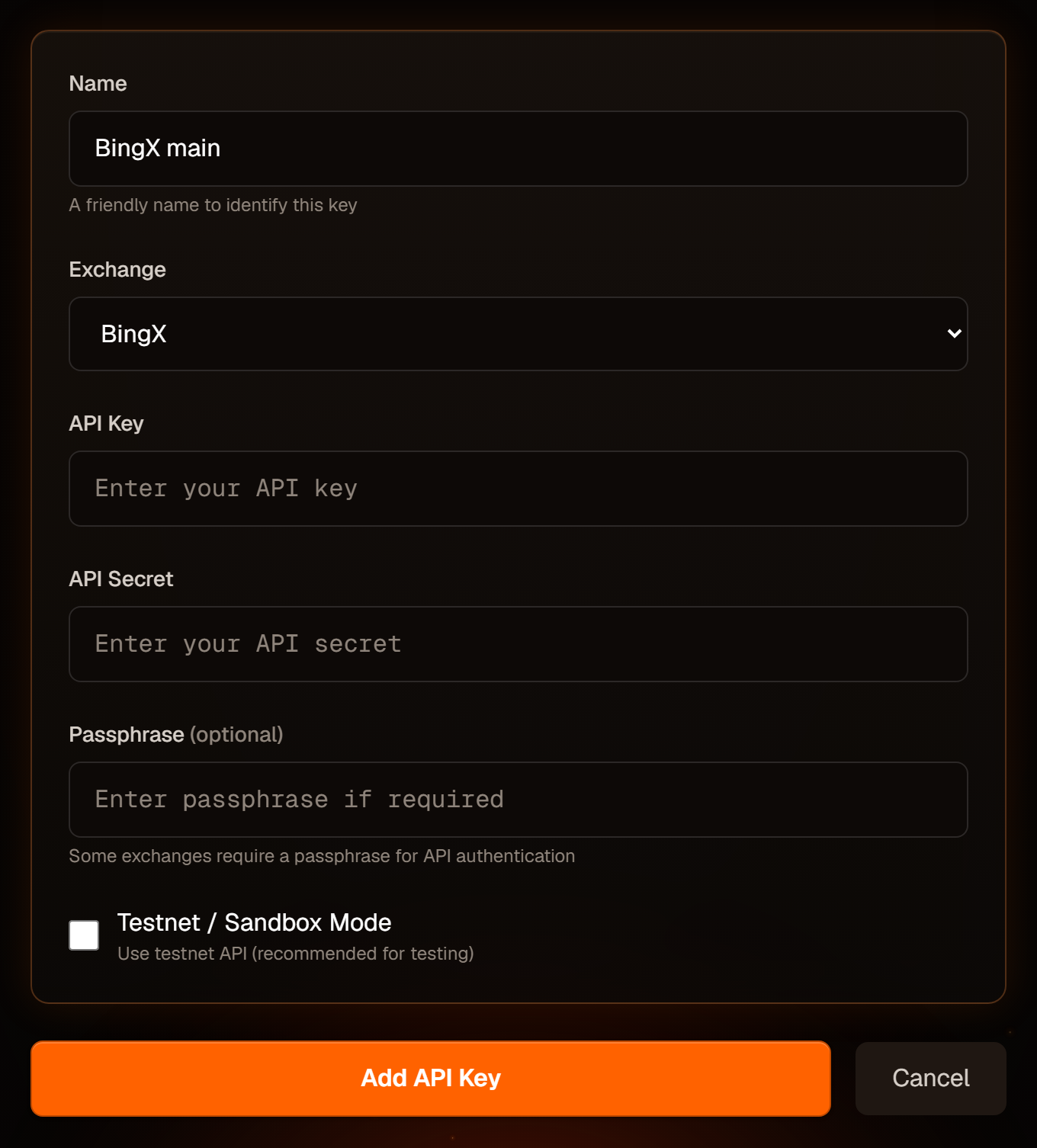
Click Add API Key. If you came from the bot form you're taken straight back to it.
MEXC
- On MEXC, open API Management → Create API and enable Spot Trading.
- In Promethean choose MEXC, paste the key and secret.
MEXC bots are spot only, MEXC has no testnet (the box is switched off), and take-profit / stop-loss aren't available on MEXC.
BingX
- On BingX, open API Management → Create API and enable Trading.
- In Promethean choose BingX and paste the key and secret.
- Untick Testnet / Sandbox Mode unless this really is a BingX testnet key — it's ticked by default for BingX.
For futures bots, your BingX USDT-M futures account must be in One-Way mode, and the leverage you set on BingX for each pair must match the bot's leverage.
Blofin
- On Blofin, open API Management → Create API, enable Trading, and set a passphrase.
- In Promethean choose Blofin and paste the key, secret and passphrase (required).
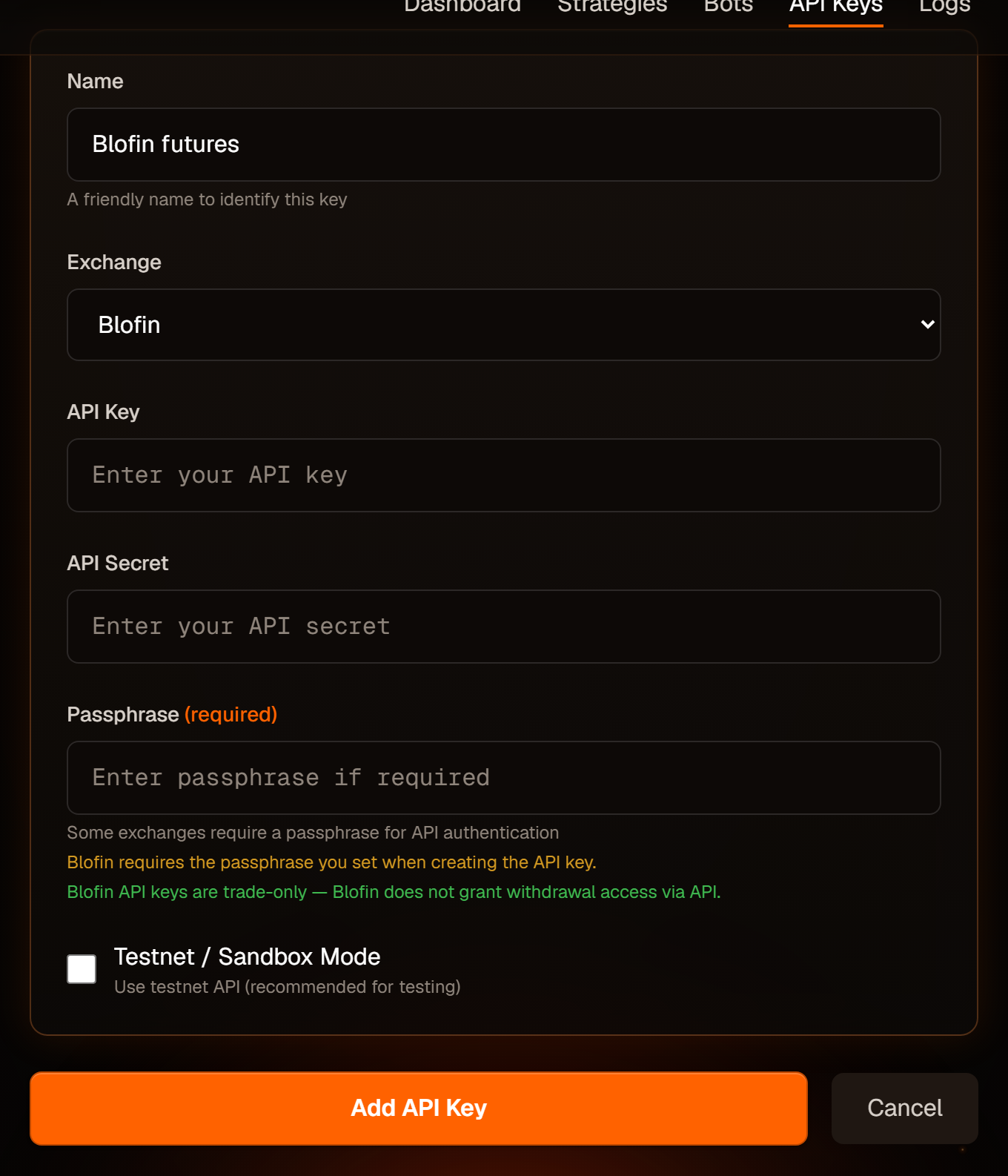
Blofin API keys are trade-only — Blofin doesn't grant withdrawal access over the API. Blofin bots are futures only, and Promethean places every Blofin order in isolated margin, so set your isolated leverage for each pair to match the bot.
Blofin keys expire after 90 days when they aren't bound to an IP address. Promethean doesn't currently provide a fixed IP to bind to, so note the date you created the key and replace it before it expires — an expired key makes every signal fail.
Hyperliquid
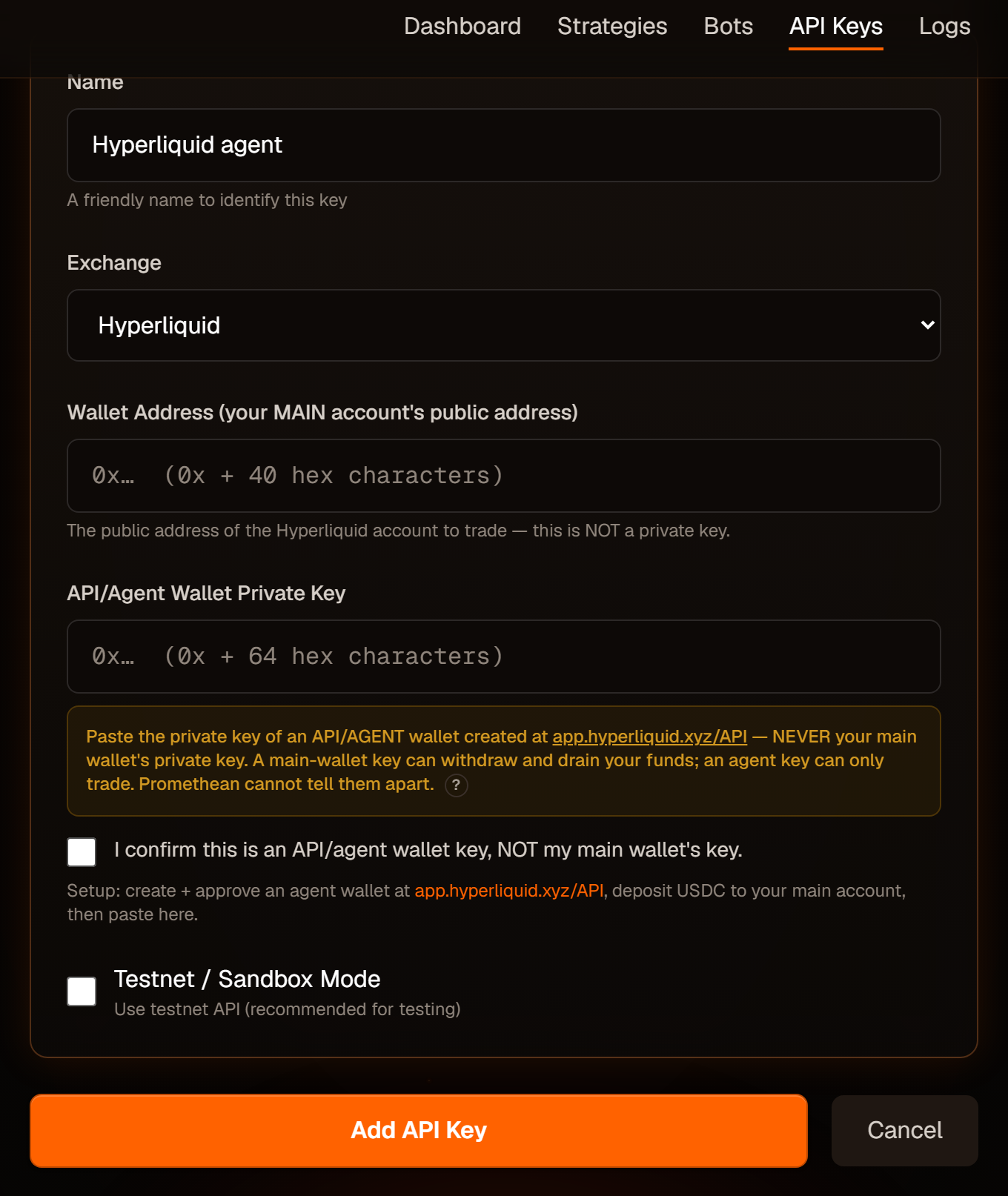
Hyperliquid uses wallets instead of API keys. You give Promethean two things:
- Wallet Address — the public address (
0x+ 40 characters) of your main Hyperliquid account, the one holding your USDC. - API/Agent Wallet Private Key — the private key (
0x+ 64 characters) of an agent wallet you create at app.hyperliquid.xyz/API.
Never paste your main wallet's private key. A main-wallet key can withdraw and drain your funds; an agent key can only trade. Promethean can't tell them apart, so you must tick "I confirm this is an API/agent wallet key, NOT my main wallet's key" before the key will save.
Setup:
- At app.hyperliquid.xyz/API, create and approve an API/agent wallet and copy its private key.
- Deposit USDC to your main account.
- In Promethean choose Hyperliquid, enter your main account's address and the agent's private key, and tick the confirmation.
Before trading on Hyperliquid, also:
- Keep your account in Standard account mode, not unified. In unified mode the futures balance reads as zero and trades can't be sized.
- Use Fixed Amount sizing on Hyperliquid bots.
- Set the leverage for each coin on Hyperliquid yourself to match the bot — Promethean can't read Hyperliquid's leverage, so it can't check it for you.
More detail in the Exchange reference.
OKX
OKX runs separate platforms for different regions, and a key from one does not work on another. Pick the entry that matches where you log in:
- OKX — the global platform at www.okx.com. Bots trade USDT perpetual futures (BTC/USDT).
- OKX Europe — the EEA platform at my.okx.com (where European accounts are). See the next section.
- On OKX, open API Management → Create V5 API key, give it the Trade permission only (leave Withdraw off) and set a passphrase.
- In Promethean choose OKX and paste the key, secret and passphrase (required).
OKX bots are futures only, placed in isolated margin: set your isolated leverage for each pair on OKX to match the bot. Your account must be in one-way (net) position mode.
OKX Europe
OKX Europe (my.okx.com) offers X-Perps instead of ordinary perpetual futures: they behave like perpetuals (funding every 8 hours, long or short) but are quoted in USD and carry an expiry about five years out.
- Pass OKX's appropriateness assessment for X-Perps in the OKX Europe app, and fund your trading account with USDC, USDG or USD.
- On my.okx.com, open API Management → Create V5 API key, permission Trade only (no Withdraw), and set a passphrase.
- In Promethean choose OKX Europe and paste the key, secret and passphrase.
When you create a bot, type the pair as BTC/USD (not BTC/USDT); Promethean picks the current X-Perp contract for it. Bots are futures only, in isolated margin, on a one-way account.
Expiry. About a month before an X-Perp expires OKX lists its successor. Promethean refuses new entries in the last 30 days of a contract and tells you to edit the bot and re-save its symbol, which moves it to the new contract. Exits are never blocked.
Manage your keys
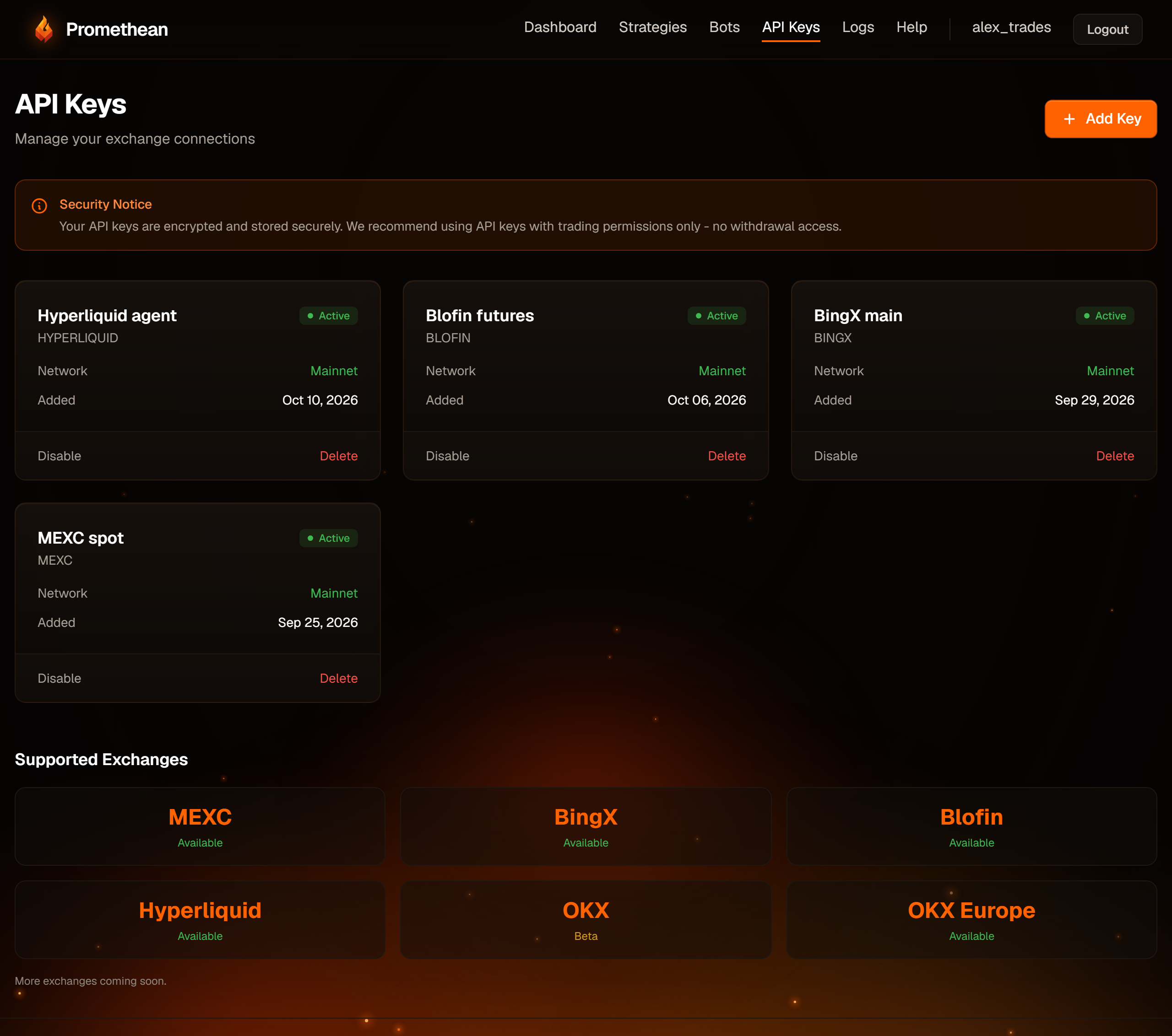
- Disable / Enable marks a key as unused for new bots: a disabled key disappears from the bot form. It does not stop bots that already use the key — to stop trading, pause the bots or use the kill switch. While a key is disabled you also can't save changes to bots that use it ("API key not found or inactive") — enable it again first.
- Delete removes the key for good. A key can't be deleted while any bot (running or paused) still uses it — delete those bots first.
- Keys can't be edited. To change one, add the new key, move your bots to it by recreating them, then delete the old one.