Create a bot
Every bot setting explained: pair, market type, sizing, leverage, take-profit, stop-loss, dry run.
A bot is one trading pair on one exchange key, plus the rules for every trade it places. Open Bots → New Bot (you'll be sent to add an API key first if you don't have one).
The basics
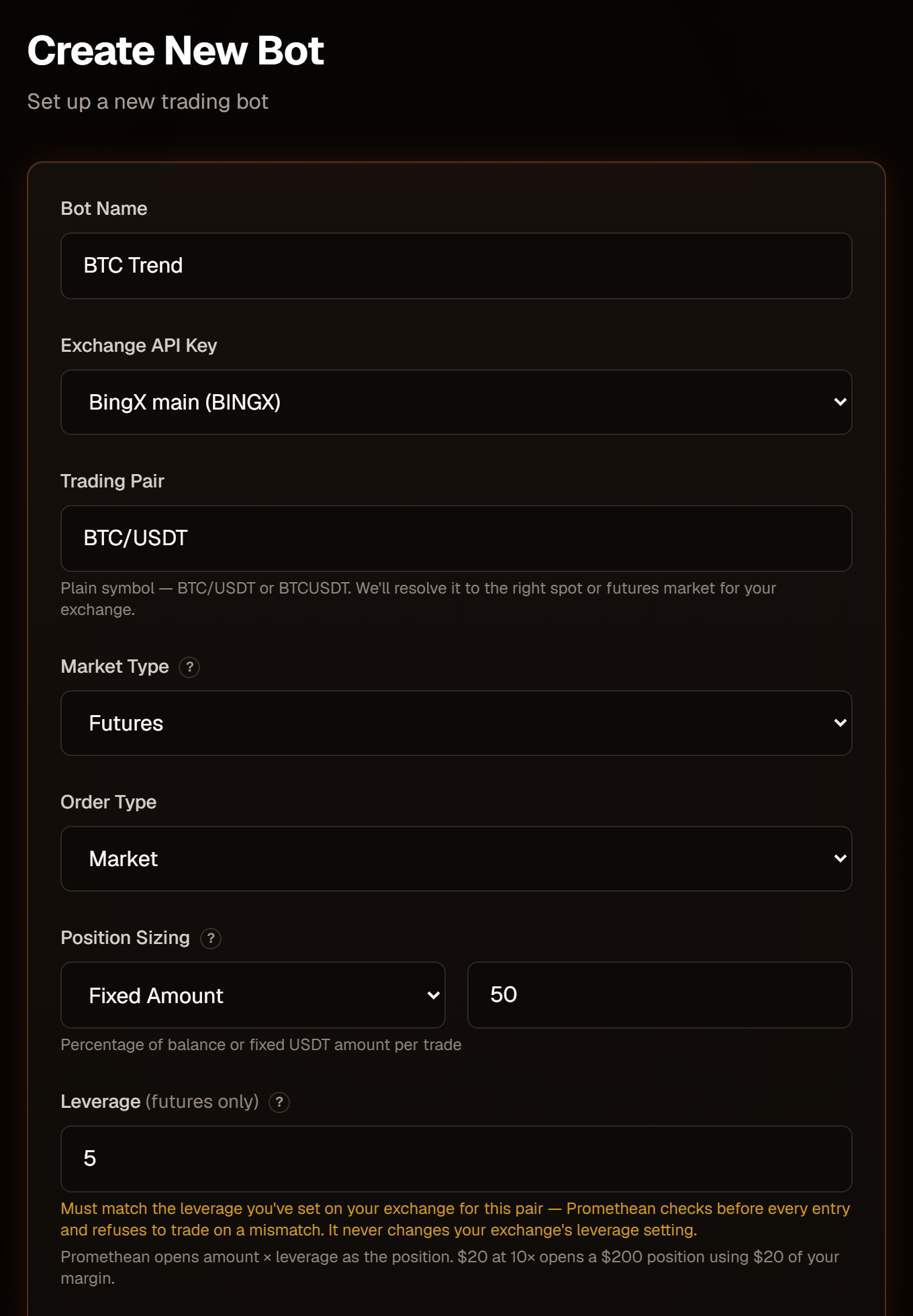
Bot Name
Any name. It appears in your bot list, your logs, and inside the alert messages (spaces become dashes there), so make it recognisable.
Exchange API Key
Which connected key the bot trades with. This is fixed once the bot is created — to move a bot to another key, create a new bot.
Trading Pair
Type the pair plainly — BTC/USDT or BTCUSDT. Promethean looks it up on your
exchange and stores the exact market for the market type you pick (spot or
perpetual futures). If the pair doesn't exist there, the form tells you:
"BTC/USDX not found in BINGX futures markets. Use BASE/QUOTE format (e.g.
ETH/USDT) and confirm the pair is listed for BINGX futures." On Hyperliquid,
perpetuals are quoted in USDC — type BTC/USDC, not BTC/USDT.
Market Type
- Spot buys and sells the coin itself. Spot bots go long only.
- Futures trades perpetual contracts and can go long or short, with leverage.
Some exchanges only offer one: MEXC is spot only; Blofin and Hyperliquid are futures only — the form locks the choice for you. BingX offers both and defaults to futures.
Futures bots need your exchange account in One-Way position mode. In Hedge mode every signal fails with "Your BINGX account is in Hedge mode…".
Order Type
- Market (recommended) fills immediately at the current price.
- Limit places a limit order at the alert's price (or the latest price if the alert doesn't include one). A limit order that doesn't fill stays open on the exchange.
Position sizing
Choose Percentage or Fixed Amount, then the number.
| Sizing | What the number means | Example (leverage 1×) |
|---|---|---|
| Fixed Amount | An amount of the pair's quote currency — USDT on MEXC, BingX and Blofin; USDC on Hyperliquid. | 50 → a 50 USDT trade |
| Percentage | A percent of the free (unused) quote balance in the account wallet the bot trades from — your futures wallet for futures bots. | 10 with 500 USDT free → a 50 USDT trade |
On futures, the amount is your margin and leverage multiplies it:
Position size = amount × leverage.
20at10×opens a 200 USDT position using 20 USDT of margin.
The size is rounded to the exchange's order-size steps. If the result is below the exchange's minimum order size, the signal fails with "Order size … is below the … minimum … Increase position size." Use Fixed Amount on Hyperliquid.
Leverage
Futures only, a whole number from 1 to 125. Spot bots always trade at 1×.
Promethean never changes the leverage on your exchange. Instead, before every entry it reads the leverage you've set there for that pair and refuses to trade if it doesn't match the bot:
Leverage mismatch: this bot is configured for 5x but your BINGX leverage for BTC/USDT:USDT is set to 10x, so the margin used would not match the bot's size. No order was placed.
So set the same leverage in both places. Notes per exchange:
- BingX — long and short leverage are checked separately; set both.
- Blofin — orders are placed in isolated margin, so set the isolated leverage for the pair.
- Hyperliquid — leverage can't be read, so it isn't checked. Set it on Hyperliquid yourself.
Exits are never blocked by the leverage check.
Take-profit and stop-loss
Both are optional and set as a percent from your entry price:
- Long: take-profit above entry, stop-loss below.
- Short: take-profit below entry, stop-loss above.
They're placed on the exchange together with the entry order and trigger on the mark price, so they work even if Promethean is offline. Available on futures bots on BingX, Blofin and Hyperliquid — not on spot bots and not on MEXC (the fields switch off).
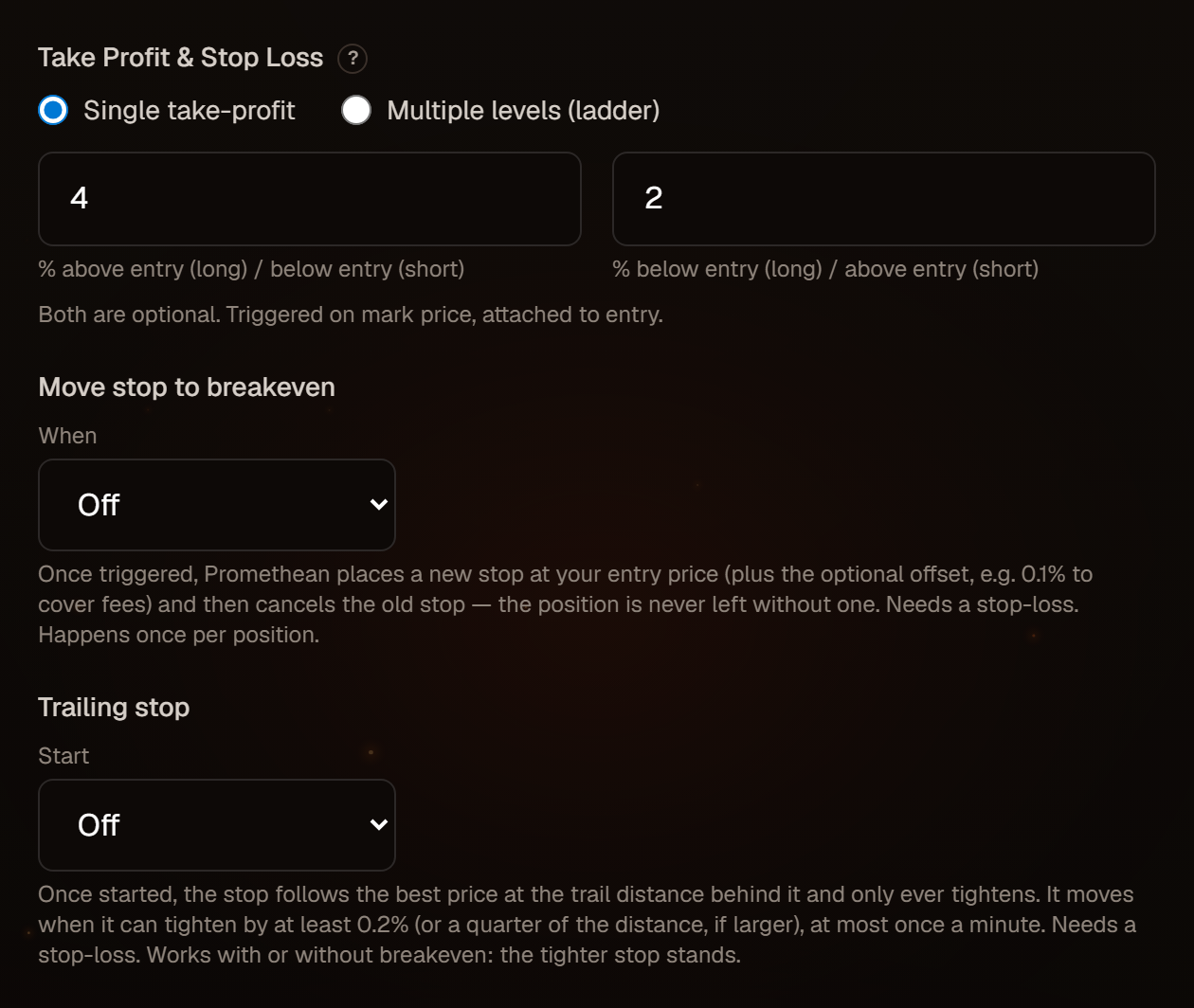
If you create a futures bot with no stop-loss, the browser asks you to confirm: "You are trading without a stop loss and could risk more than you intend, up to full liquidation. Are you sure?"
Multiple take-profit levels (ladder)
On futures bots you can switch Take Profit to Multiple levels (ladder) to take profit in steps:
- Up to 6 levels.
- Each level has a TP % (distance from entry) and a Size % (how much of the position it closes).
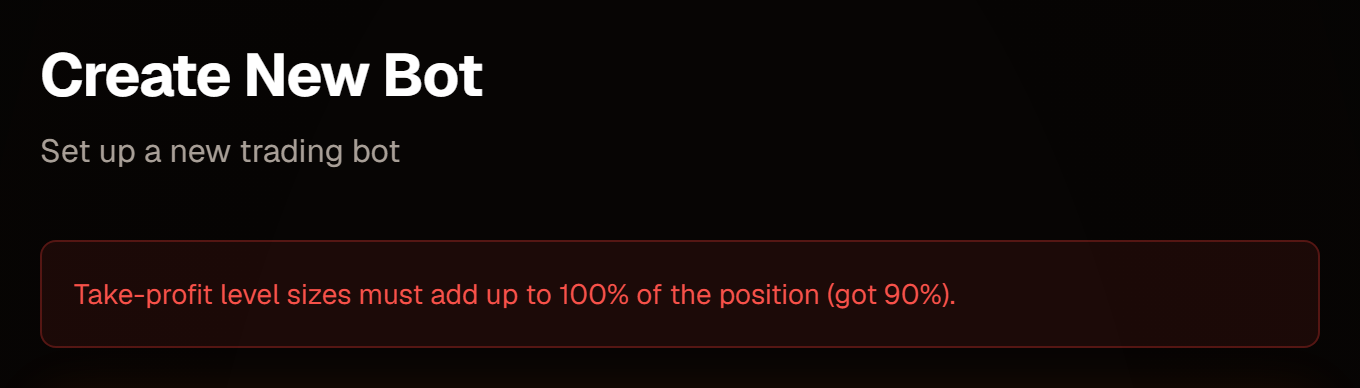
- TP % must increase from level to level, and the sizes must add up to exactly 100% — the counter under the levels shows the running total.
After the entry fills, each level is placed as its own reduce-only take-profit order on the exchange. The stop-loss stays attached to the whole position. When a level fills, the remaining levels and the stop-loss keep working; when your exit signal arrives, Promethean closes whatever is left and the remaining take-profit orders are cancelled.
Very small levels can fall below the exchange's minimum order size. The form warns you when a level would close less than about 10 USDT. If some levels fail to place at entry, the trade still opens and the log says so:
PARTIAL TP PROTECTION: 1 of 3 take-profit levels FAILED to place (…). The position is OPEN with the attached stop-loss; resting TP levels: 1, 2. Failed levels will NOT close this position — review and manage the missing levels manually.
Move stop to breakeven
On futures bots with a stop-loss you can have Promethean move the stop to your entry price once the trade is working, so it can no longer turn into a loss:
- After TP level — once take-profit level N is confirmed filled by the exchange (ladder bots; not the last level, which closes the whole position).
- After price move — once the price has moved X% in your favour from entry (for example 1.5%). X must be below your furthest take-profit.
- Offset % beyond entry (optional) — place the stop slightly into profit, for example 0.1%, so a stop at "breakeven" also covers trading fees.
How the move works: Promethean places the new stop first, checks that the exchange holds it, and only then cancels the old one — the position is never left without a stop. If the price has already fallen back to the new stop level, it waits and tries again rather than placing a stop that would fire immediately. The move happens once per position and is sized to whatever is still open. You'll see it on the positions panel (the SL chip shows · BE), on the Logs page ("Stop moved to breakeven") and in position history.
Turning it on for a bot also covers a position that bot already has open.
Trailing stop
A trailing stop follows the price as the trade goes your way, keeping your stop a fixed distance behind the best price the position has reached. It only ever moves to protect more — never back.
- Start — when trailing begins: After TP level N is confirmed filled (ladder bots), or After price move of X% in your favour from entry. X must be below your furthest take-profit.
- Trail distance % — how far behind the best price the stop sits (0.5% to 50%). For a long at a best price of 103 with 2%, the stop is at 100.94.
To keep the number of exchange requests sensible, the stop is only moved when it can tighten by at least 0.2% (or a quarter of the trail distance, if that is larger), and at most once a minute per position. Each move works like the breakeven move: the new stop is placed and confirmed before the old one is cancelled, and it is sized to whatever is still open.
You can use it together with Move stop to breakeven: the stop only moves when the new level is tighter, so whichever is higher (for a long) stands. On the positions panel the SL chip shows · Trail once the stop has trailed; each move is listed on the Logs page ("Trailing stop moved").
Dry run mode
Dry Run Mode is ticked on every new bot. A dry-run bot does everything a live bot does — reads your account, checks position mode and leverage, calculates and rounds the order size, works out take-profit and stop-loss prices — and then stops before placing the order. The log entry shows DRY_RUN with the quantity and price it would have used.
Demo trades
A dry-run bot keeps a demo position: a paper trade that is never sent to your exchange, so you can watch how the bot would actually trade.
- An entry signal opens the demo position at the signal's price, sized exactly as a live order would be, with the same take-profit, stop-loss and take-profit levels.
- It closes on the bot's exit signal (at the signal's price), or when the live price reaches its take-profit or stop-loss — Promethean simulates the fill at the trigger price, level by level for a take-profit ladder.
- Demo positions appear under Open Positions and in Position History with a DEMO badge. Use the All / Live / Demo switch to filter. The PnL totals count your real trades only; the Demo view shows the demo total.
- Results are an estimate: no fees, funding or slippage. Breakeven and trailing stops are not simulated on demo positions.
Things to know:
- Dry run reads your real exchange account, so the API key must be valid. A wrong key fails in dry run just as it would live.
- If your account already holds a position on the pair, the demo trade still opens, but the log says live would refuse the entry.
- Switching a bot to live closes its demo position at the current price, so the live bot starts with no position. Changing a dry-run bot's symbol or market type closes it too.
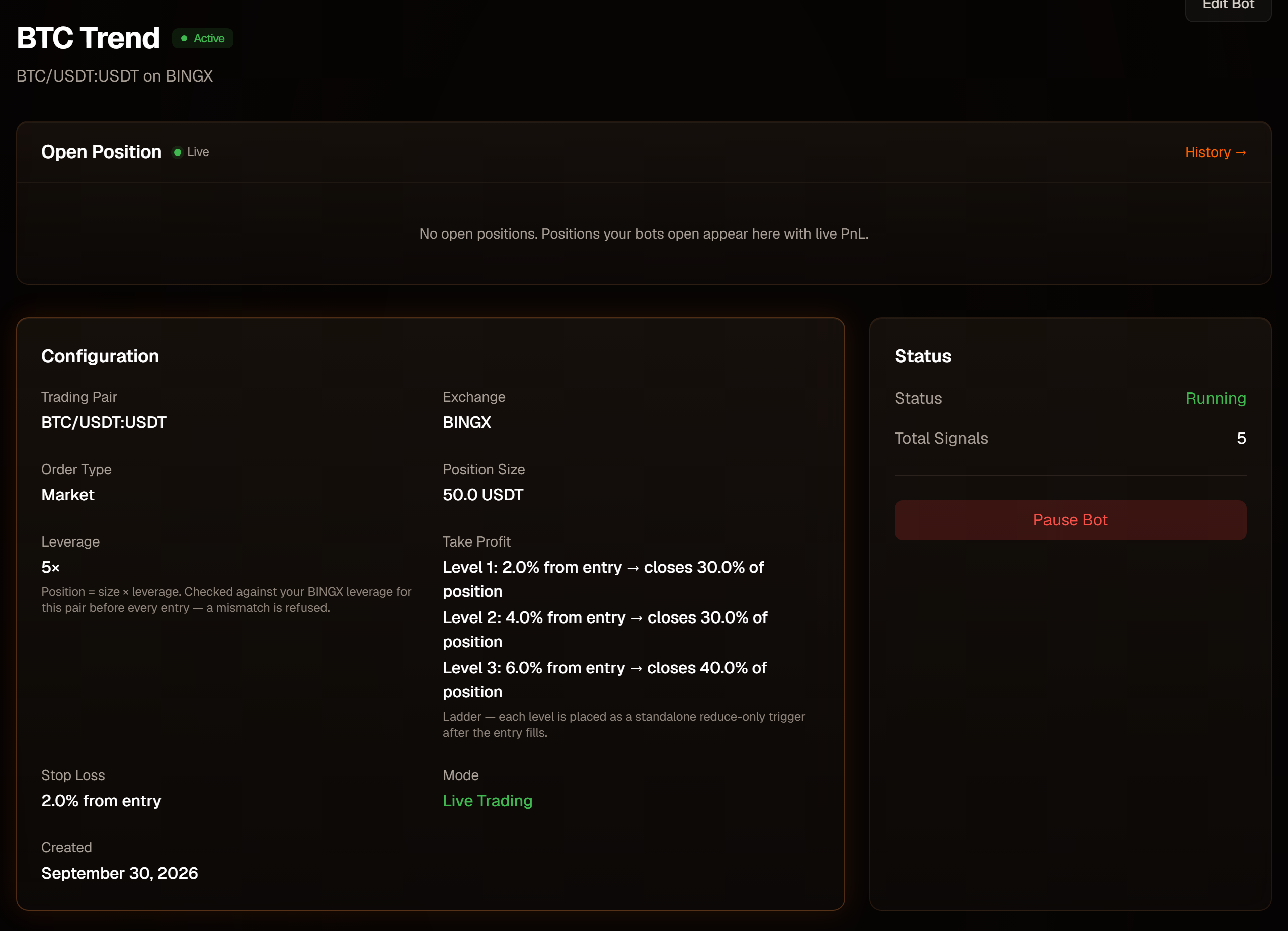
When you're happy, open the bot, click Edit Bot, untick Dry Run Mode and save. The bot page then shows Live Trading.
Editing a bot
Edit Bot changes any setting, plus the Active switch ("Bot will process incoming signals"). Changes apply to the next signal.
The API key can be swapped for another key on the same exchange — a renewed key, or your live key after testing on a demo key. To trade on a different exchange, create a new bot.
While the bot has an open position, its API key, pair and market type are locked: the bot finds its position through them, and changing one would make it lose track of a position that's still open on the exchange. Close the position first (send the EXIT signal, or close it on the exchange); everything else — stop-loss, take-profits, size, breakeven, trailing — can be changed at any time.
Validation errors appear at the top of the form, and your input is kept so you can fix it: